
How a POS System Integrates with Your Kitchen

A POS system integrates with a kitchen display system (KDS) by electronically transmitting orders from the front of house to kitchen screens in real time, replacing paper tickets with a digital order queue that kitchen staff can act on immediately. This POS system kitchen integration is the operational backbone of any modern restaurant. It covers item-level routing, modification tracking, and multi-channel order consolidation. Understanding how these systems connect helps restaurant owners cut preparation times, reduce errors, and keep every station synchronized during service.
How does a POS system integrate with kitchen operations?
POS-KDS integration is the digital handoff between your order-taking software and the screens mounted in your kitchen. When a server enters an order at the POS terminal, or a guest places one through a QR code or online platform, that order transmits instantly to the KDS. No paper ticket gets printed. No runner carries a chit to the line. The kitchen sees the order within seconds of it being placed.
The KDS itself consists of a ruggedized touchscreen display, a software layer that receives and organizes order data, and a network connection to the POS. The software interprets each order and routes items to the correct prep station. A burger goes to the grill station. A salad goes to the cold station. Both items appear timed to finish together at the pass.
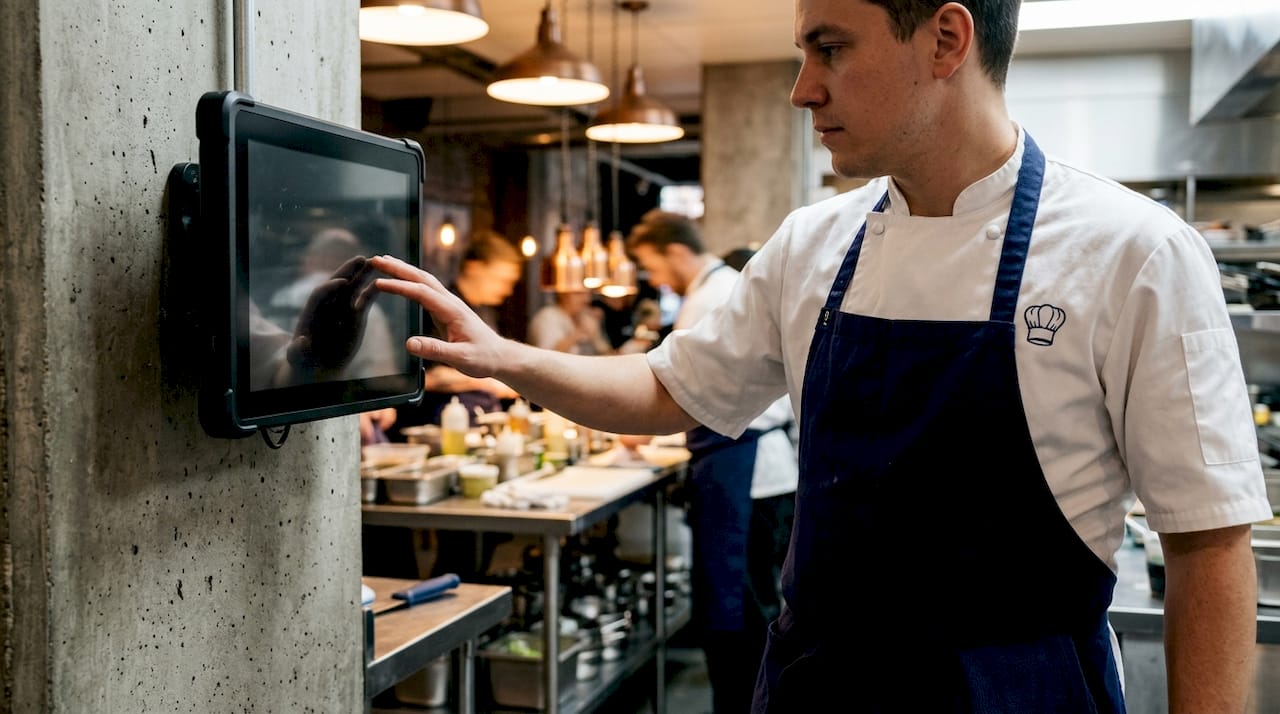
This coordination is what separates a KDS from a simple receipt printer. Item-level routing sends food components to the correct kitchen stations and syncs their preparation timing. That synchronization is what gets a full table’s food to the pass at the same moment, not in three separate waves.
Pro Tip: Mount your KDS screens at eye level for each station. Kitchen staff should read orders without breaking their working posture. Ergonomics directly affect how fast your team processes tickets.
The data exchange between POS and KDS runs in both directions. When a cook marks an item complete on the KDS, that status travels back to the POS. Bidirectional communication keeps front-of-house staff informed when food is ready, which reduces the time servers spend checking on orders and improves table turn speed.
How POS systems transmit orders and consolidate multiple channels
Order transmission from POS to KDS happens through one of two technical paths: a native integration or a third-party API bridge. The path you choose has a direct impact on reliability and data accuracy.
Native POS and KDS integrations provide a unified, sequenced order queue that consolidates dine-in, QR code, online, and delivery app orders. That unified queue eliminates the separate middleware latency that third-party bridges introduce. In practical terms, native integration means fewer dropped modifiers, fewer out-of-sequence tickets, and less troubleshooting when something goes wrong.
The table below compares the two integration approaches across the factors that matter most to operators.
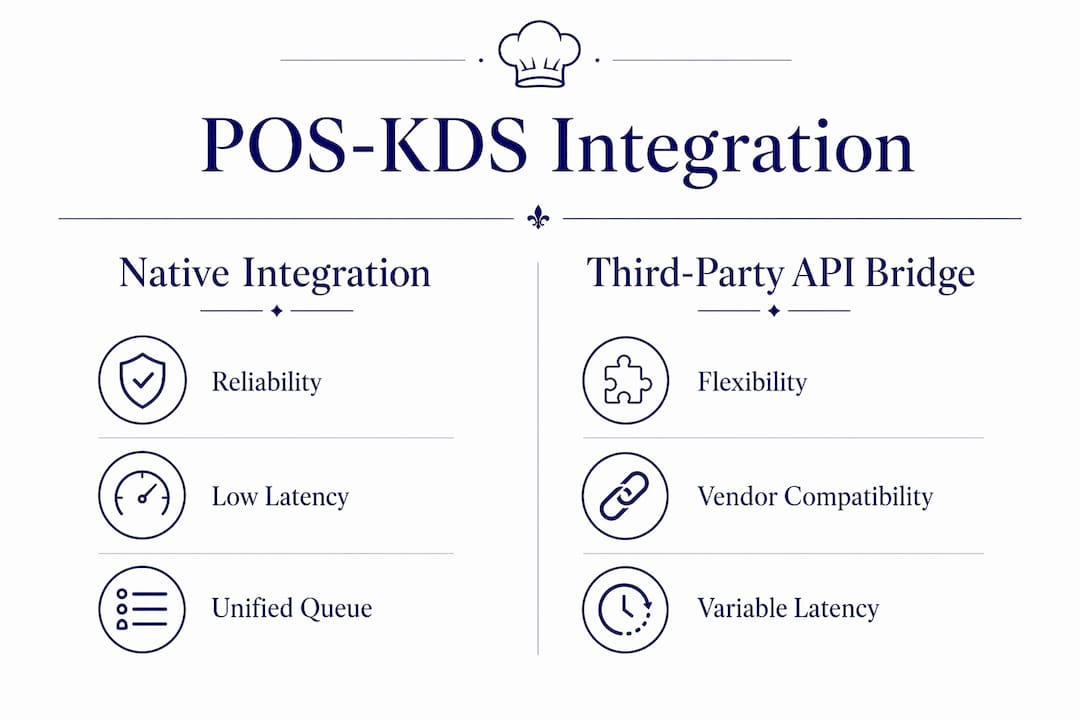
| Factor | Native integration | Third-party API bridge |
|---|---|---|
| Order latency | Near zero | Variable, depends on middleware |
| Modifier accuracy | High, direct data transfer | Risk of data loss in translation |
| Setup complexity | Lower, single vendor | Higher, multiple vendor coordination |
| Ongoing cost | Included or bundled | Additional monthly API fees |
| Support accountability | Single point of contact | Shared between vendors |
Third-party bridges are not inherently bad. They are the only option when your POS and KDS come from vendors with no native partnership. The key is to test the integration under peak-service conditions before committing, because latency and modifier loss tend to surface only under load.
Multi-channel consolidation is where the real operational gain appears. A restaurant running dine-in service, a delivery app, and a QR code ordering program without a unified KDS queue ends up with kitchen staff managing three separate ticket streams. Unified sequencing improves order accuracy and eliminates the confusion of parallel queues. Every order, regardless of its source, appears in a single prioritized list on the KDS.
What are the real benefits of POS and KDS integration?
The most direct benefit is speed. Restaurants implementing a KDS instead of paper orders reduce average ticket preparation times by 15%–30%. That reduction compounds across a full service: faster tickets mean more covers per shift, which means higher revenue from the same kitchen footprint.
Error reduction is the second major gain. Handwritten tickets introduce two failure points: legibility and completeness. A server’s handwriting under pressure is not always clear. A modifier written at the bottom of a ticket gets missed. Digital transmission eliminates both problems. Modification alerts displayed with distinct visual cues on the KDS prevent missed order changes during busy service. That visibility is what keeps a “no onions, extra sauce” from becoming a remade plate and an unhappy guest.
The operational benefits extend beyond speed and accuracy:
- Real-time performance tracking. Managers can see ticket times by station and identify bottlenecks without walking the line.
- Waste reduction. Accurate order data means fewer remade dishes and less food discarded due to errors.
- Inventory updates. Some KDS platforms feed completion data back to inventory management, decrementing stock as items are prepared.
- Staff accountability. Digital records show which station completed which ticket and when, giving managers objective performance data.
Connecting your commercial kitchen prep station layout to your KDS routing logic amplifies these gains. When your physical station arrangement matches your digital routing rules, cooks move less and produce more.
The benefits of automated kitchen equipment pair directly with KDS integration. Digital order management and automated cooking equipment together reduce the manual steps between order receipt and plate delivery.
What to consider when selecting and implementing POS-KDS integration
Selecting the right integration starts with your kitchen staff, not your front-of-house team. Kitchen staff preferences should drive KDS selection because the system directly affects kitchen efficiency and morale. A KDS that line cooks find confusing or slow will create friction regardless of how well it integrates with your POS.
Four factors deserve careful evaluation before you commit:
- Usability of the KDS interface. Test the display with actual kitchen staff during a trial period. Screen size, font size, color coding, and touch responsiveness all affect how fast a cook can process a ticket under pressure.
- Native versus third-party integration. Most POS systems support KDS integration, but native integrations provide the highest reliability and data fidelity. Confirm whether your preferred POS and KDS vendors have a direct partnership before purchasing.
- Total cost of ownership. Hardware costs for KDS screens range from $700–$1,200 per screen, plus monthly software fees per display. A kitchen with four stations needs four screens. That cost adds up before you factor in installation and ongoing support.
- Modification visibility and recall features. The KDS must display modifications prominently. It should also allow staff to recall recently completed tickets in case a plate needs to be checked or remade.
Pro Tip: Run a one-week parallel test before going fully digital. Keep paper tickets as a backup while your team learns the KDS. This reduces service disruption and gives you real data on where the digital workflow needs adjustment.
Integration complexity is often underestimated. Total cost of ownership extends beyond upfront software costs and includes multiple hardware screens, monthly software fees per display, and integration management. Budget for the full picture, not just the software subscription.
Key Takeaways
A POS system integrates with a kitchen display system by transmitting orders digitally in real time, routing items by station, and enabling bidirectional status updates that coordinate the entire kitchen.
| Point | Details |
|---|---|
| Native integration wins on reliability | Choose native POS-KDS connections to avoid latency and modifier data loss from API bridges. |
| Ticket times drop 15%–30% | Replacing paper tickets with a KDS cuts preparation time and increases covers per shift. |
| Unified queue eliminates channel chaos | Consolidating dine-in, QR, online, and delivery orders into one KDS queue reduces kitchen errors. |
| Staff usability drives adoption | Let kitchen staff evaluate the KDS interface before purchase; their buy-in determines success. |
| Total cost includes hardware per screen | Budget $700–$1,200 per KDS screen plus monthly fees before committing to a system. |
The KDS is your kitchen’s real command center
Most operators spend the majority of their technology budget evaluating POS front-end features: table management, split checks, loyalty programs. That focus is understandable. The front of house is where guests interact with your brand. But choosing a POS based primarily on front-end features without compatible KDS logic leads to bottlenecks that no amount of server training can fix.
I have seen kitchens where the POS was excellent and the KDS was an afterthought. The result was a beautiful ordering experience at the table and a chaotic, slow kitchen behind the wall. The KDS is where your revenue is actually produced. A plate that takes 22 minutes instead of 14 minutes costs you table turns, tips, and repeat visits.
The biggest misconception I encounter is treating the KDS as a “paperless printer.” It is not. A well-configured KDS is a data hub that tracks timing, routes by station, flags modifications, and feeds performance data back to management. Operators who treat it that way get the full return on their investment. Operators who treat it as a screen that shows tickets get only a fraction of the value.
My practical advice: involve your head cook or kitchen manager in the KDS selection process from day one. They will identify interface problems that no sales demo will reveal. And when you go live, plan for a two-week adjustment period. Your ticket times will temporarily increase before they drop. That is normal. The long-term gains are worth the short-term friction.
Culinaryprofis and your kitchen technology setup
Restaurant operators who invest in POS-KDS integration need the physical kitchen infrastructure to match. A digital order system works best when the equipment behind it is reliable and built for commercial volume.
Culinaryprofis carries commercial-grade kitchen equipment suited for restaurants running integrated digital workflows, from gas ranges and ovens to refrigeration and prep tools. Every product in the catalog is selected for professional performance and durability under daily service conditions. If you are upgrading your kitchen technology stack, the physical equipment matters as much as the software. Browse the full restaurant kitchen equipment catalog at Culinaryprofis, or contact the support team directly for guidance on building a kitchen that matches your operational goals. Free shipping and expert support are available on every order.
FAQ
What is a kitchen display system (KDS)?
A KDS is a ruggedized touchscreen mounted in the kitchen that receives and displays orders transmitted from the POS system in real time, replacing paper tickets with a digital queue organized by station and priority.
How does a POS connect to a kitchen display system?
A POS connects to a KDS through either a native integration built by the same vendor or a third-party API bridge. Native connections offer lower latency and higher data accuracy than API bridges.
How does POS-KDS integration reduce kitchen errors?
Digital transmission eliminates handwritten tickets and missed modifiers. KDS software displays modifications with visual alerts, which prevents kitchen staff from overlooking order changes during busy service.
What does POS-KDS integration cost?
KDS hardware typically costs $700–$1,200 per screen, plus monthly software fees per display. A kitchen with multiple stations needs one screen per station, so total costs scale with kitchen size.
Can a KDS handle orders from multiple channels at once?
Yes. A properly integrated KDS consolidates dine-in, QR code, online, and delivery app orders into a single unified queue, eliminating the confusion of managing separate ticket streams from different order sources.